How to Evaluate a CRM: What Actually Matters for Service Businesses
A practical framework for choosing a CRM that actually works in real operations — not just in demos.
Why Most CRM Comparisons Are Superficial
Most CRM comparison lists focus on features: booking, payments, messaging, “all-in-one” checkboxes.
Service businesses usually regret something else: operational friction that appears later. Not missing features.
The breaking point is often scheduling pressure, staff complexity, multi-location growth, and higher daily load. Systems that look fine in demos can degrade when time, resources, and roles start colliding.
This article proposes a practical evaluation framework for CRM systems that prioritizes operational reality over feature checklists.
At first, most systems appear sufficient when evaluated feature by feature.
However, this changes once the system is exposed to real operational pressure and scale.
This is where understanding what actually breaks first in scheduling systems becomes more important than comparing features.
CRM selection logic (simplified)
Where most decisions go wrong
The illusion of fast setup
Architecture debt
You’re not picking a “tool”. You’re picking a long-term operational constraint system. Evaluate architecture first, then features.
The easier a CRM feels on day one,
the more important it is to examine what it hides structurally.
The 7-Dimension CRM Evaluation Framework
A CRM system for service businesses (salons, clinics, studios, repair services, etc.) should be evaluated across seven structural dimensions:
- Operational Depth
- Multi-Location Logic
- Access & Role Architecture
- Financial Transparency
- Data Portability
- Privacy & Security Model
- Long-Term Scalability
Each dimension reveals a different class of risk.
1. Operational Depth
Many tools labeled “CRM” are actually booking systems with contact storage.
Key question:
Does the system model your real workflow, or does it only record appointments?
Evaluate:
- Can services have duration overrides?
- Are schedule conflicts structurally prevented?
- Can roles differ in operational permissions?
- Is there structured visit history beyond notes?
What appears as a usability issue is often a structural limitation in how the system models time and resources.
This is why “simple” tools can create complex operational workarounds later.
Shallow systems create operational drift.
Deep systems reduce manual correction over time.
2. Multi-Location Logic
This is where most systems break.
Ask:
- Is a client tied to a location or to a network?
- Can central reception schedule across branches?
- Can analytics be filtered without data fragmentation?
- Are pricing rules global or location-bound?
A system that allows invalid states will eventually create operational problems, even if it looks simple at first.
This is where most systems start to break.
A scalable CRM separates:
- Identity
- Location
- Access
- Reporting
Without that separation, growth introduces chaos.
3. Access & Role Architecture
CRM systems often fail in permission modeling.
Minimum required role distinctions:
- Owner (analytics only)
- Manager (operational + limited financial visibility)
- Professional (personal schedule + personal history only)
- Front desk (scheduling without financial visibility)
If a system does not allow granular visibility separation, internal friction becomes inevitable.
4. Financial Transparency
Ask:
- Are tips separated from revenue?
- Are non-printed transactions handled structurally?
- Can salary rules differ by service type?
- Are adjustments logged?
A CRM is not only a booking tool — it is a financial interface.
Weak financial modeling leads to accounting reconciliation problems later.
This is not a feature problem. It is a structural limitation.
5. Data Portability
Many businesses only discover this problem when leaving a system.
Evaluate:
- Can you export full client data?
- Are visit photos exportable?
- Is structured data preserved?
- Are reports machine-readable?
If the answer is unclear, vendor lock-in risk is high.
6. Privacy & Security Model
Few CRM evaluations include this.
Critical questions:
- Is sensitive data encrypted?
- Are financial modules protected separately?
- Are audit logs present?
- Can sensitive sections be hidden by default?
Security should be architectural — not cosmetic.
7. Long-Term Scalability
Short-term convenience often conflicts with long-term sustainability.
Evaluate:
- Does the system allow structural configuration?
- Can new business models be layered?
- Does it separate business logic from interface?
- Is the product actively maintained?
Scalability is not about features — it is about flexibility without structural collapse.
CRM System Categories
Most CRM tools fall into one of four categories:
| Category | Strength | Limitation |
|---|---|---|
| Booking-first tools | Easy setup | Limited operational modeling |
| Marketing-driven CRM | Client communication | Weak internal structure |
| Enterprise systems | Strong architecture | Complex, expensive |
| Vertical SaaS platforms | Industry alignment | Varies by vendor maturity |
Understanding category type helps avoid mismatched expectations.
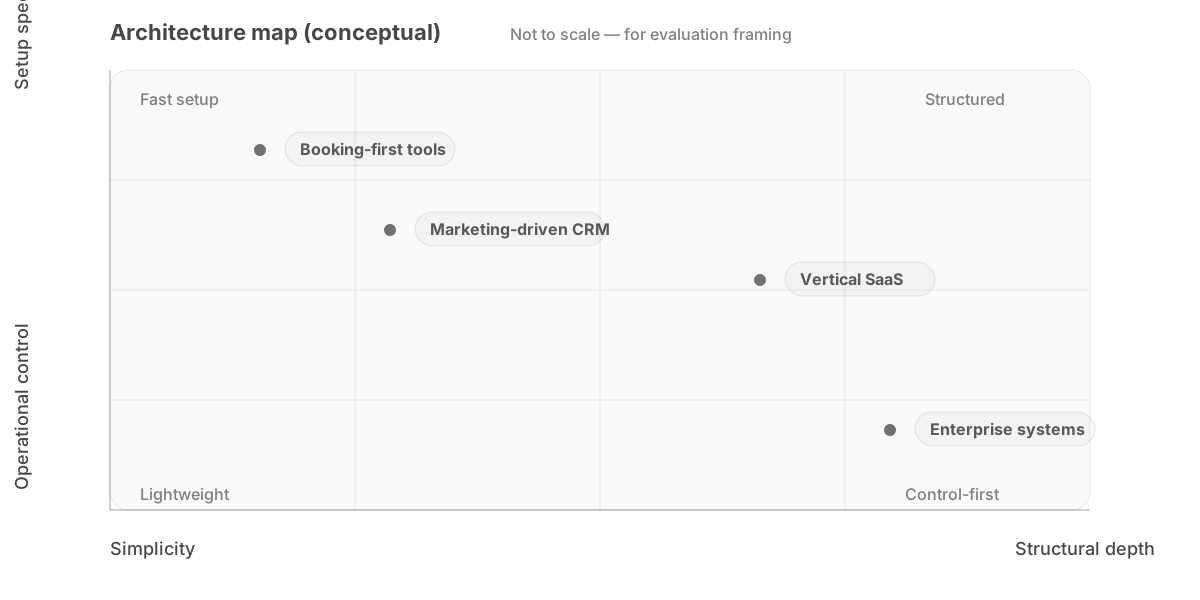
Evaluation variables
- Workflow depth — shallow vs deep process modeling
- Multi-location — single site vs network architecture
- Roles — coarse vs granular permissions
- Data portability — unclear vs structured/exportable
A Practical Evaluation Checklist
Before choosing a CRM, document:
- Your salary calculation rules
- Your access control expectations
- Your expansion plan (1 location vs 10)
- Your financial reporting needs
- Your data ownership requirements
Then test the system against those constraints.
Not against marketing pages.
Final Principle
A CRM should reduce structural entropy over time.
If complexity increases as your business grows, the system is misaligned.
The correct system does not merely automate tasks.
It enforces operational clarity.
That distinction determines long-term viability.
Some newer systems, such as Visaxa, are beginning to address these constraints more directly.
Related perspective
Scheduling issues often do not come from the tool itself, but from how time, services, and constraints are defined in the business.
→ Why Appointment Scheduling Systems Fail Service Businesses
Most scheduling systems don’t fail because of missing features.
They fail because they don’t enforce real-world constraints.
Most systems appear sufficient during evaluation.
But a more difficult question usually appears later:
– what actually breaks first when a system starts scaling
– why do problems only appear after growth
– what changes when scheduling becomes dense and constrained
This becomes clearer when looking at what actually breaks first in scheduling systems.
Visaxa Research examines operating problems, evidence, failure conditions, and the questions a salon should resolve before choosing software.
Visaxa Research studies what actually breaks inside service businesses — scheduling, staffing, payroll, retention, operational systems, and scaling — and turns field observations into practical frameworks for owners.